How do I open MRI files on Mac?#
- Copy the complete CD or USB study into a new folder on your Desktop, including DICOMDIR and all image folders.
- Open the DICOM viewer in a current browser.
- Drag the copied folder into the drop zone on the page. Wait for the import to finish, then select a series.
Step 1 — Find the DICOM files#
On a CD, insert the disc; Finder shows it in the sidebar. Inside you'll usually see a folder called DICOM, IMAGES, or the patient's name, sometimes with a bundled viewer. A .exe launcher is for Windows; a .app bundle is for macOS. You do not need either for browser viewing. Keep DICOMDIR and all image folders together. On a USB, open the drive; same story. On a downloaded ZIP, double-click it in Finder to extract before continuing.
Step 2 — Copy the folder to your Desktop#
Copy the complete disc contents into a new folder on your Mac. Wait for copying to finish and keep all filenames and subfolders intact. Work from that local copy rather than reading repeatedly from the disc.
Step 3 — Open OpenMyScan#
Open the DICOM viewer in a current browser (Chrome, Safari, Edge, or Firefox). Keep your browser up to date and locate the drop zone or 'Choose folder' button.
Step 4 — Drag the folder in#
Drag the Desktop copy of the DICOM folder onto the drop zone labelled "Drop your scan folder here." If dragging does not work, click 'Choose folder' and select that same copied parent folder. The page shows import progress while it reads the files. Loading time depends on the study size, image encoding, browser, and computer. If a file cannot be read, keep the error message for troubleshooting.
Step 5 — Navigate the scan#
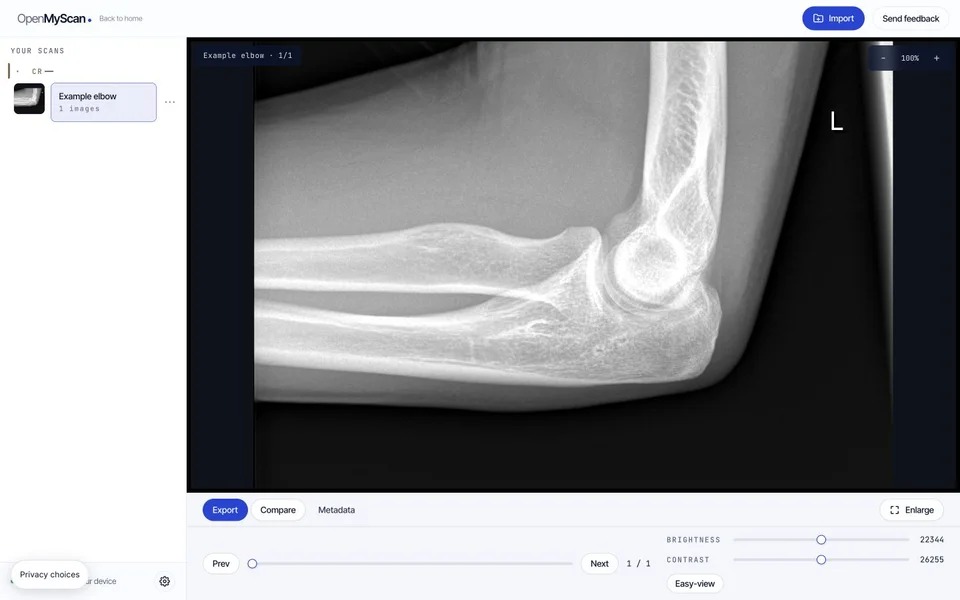
Use the slice slider or the left/right arrow keys to move through slices. In the single-image view, the mouse wheel or trackpad scroll zooms the image. Adjust brightness / contrast with the controls below the image. If the image looks too dark, tap "Easy-view". For MRI this adjusts brightness and contrast so anatomy is easier to see. (CT scans use clinical window presets. The Easy-view button re-adjusts those presets for general visibility. For CT, this may not reflect how your radiologist was reading the images.) Our free MRI viewer picks up the sequence list (T1, T2, FLAIR, DWI) automatically when your study contains multiple.
Why does my hospital CD not open on Mac?#
- Finder shows a hybrid disc window with a Mac Installer
- Many hospital CDs have a Mac autorun wrapper that doesn't work on current macOS. Don't run it. Navigate the disc manually to the
DICOMfolder. - I see
DICOMDIRbut no.dcmfiles - That is the study index, not the images. Choose the complete folder containing it and its neighboring image folders; do not select only DICOMDIR.
- The CD is scratched or won't mount
- Try another compatible drive or computer. If copying still fails, ask the imaging center for a replacement disc or complete DICOM download.
Which files should I keep together?#
Copy the whole disc into one new folder, including DICOMDIR and all image folders beside it. Keep their names and subfolders unchanged. The index alone has no image pixels; files named IM000001 can be valid images even without a .dcm extension. Our DICOMDIR guide shows what belongs together.
If your scan arrived as a download, follow the Mac and Windows ZIP instructions before choosing the extracted folder.
What should I check if my scan still will not open?#
| What happens | What to try |
|---|---|
| No files load after a drop | Use the folder picker and select the copied parent folder. Check that it contains actual image files. |
| Only a report or DICOMDIR appears | Ask the sender for the complete DICOM study, including its image folders. |
| Only one series appears | Check the series list and compare the copied folder with the original. One loaded series does not prove the export is complete. |
| A frame produces a decoding error | Keep the exact message. Try the original file in another compatible viewer or request a fresh export. |
See the DICOM troubleshooting guide for blank images, incomplete downloads, and browser errors. Use a desktop or laptop and a viewer window at least 1200 pixels wide; a small-window notice is different from a damaged-file error.
Common questions#
Do I need an Apple Silicon or Intel-specific version?
No. Everything runs in your browser; the same page works on M1/M2/M3 Macs and older Intel ones.
Does this work offline?
You can continue viewing an already loaded study while its tab stays open. Load the intended study and try the features you need while online first: an uncached decoder or feature may still require a connection. Loading the page once does not guarantee full offline use after reopening it.
Can I view my scan on my phone?
No. The viewer needs a browser window at least 1200 pixels wide to show images alongside the series list. Use a laptop or desktop, or a tablet only if its browser window meets that width. Rotating an iPad to landscape does not guarantee enough space. Guides remain available on smaller screens.